You can see the Storage Chest of the character you are playing by either pressing I on the keyboard, hotkey B, or the Storage Chest icon at the bottom of the game screen.
The Storage Chest is divided into 3 spaces: Battle Inventory, Storage Chest, and Favorites.
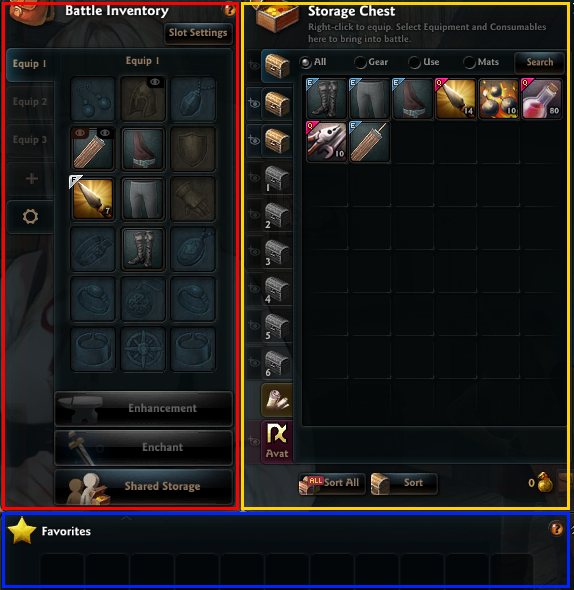
The left side of the inventory is called the 'Battle Inventory.'
This area shows the items equipped by the character.
This equipment area supports upto three tabs, allowing you to set up various items.
You can also divide this area into three parts, depending on the type of items equipped like the image below.
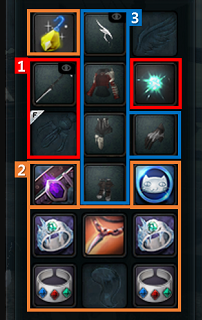
1) Slots to equip weapon, secondary weapon, and auxiliary equipment.
2) Slots to equip accessory (earrings & belt & jewelry & bracelet & ring).
3) Slots to equip armor (head & chest & leg & hand & feet).
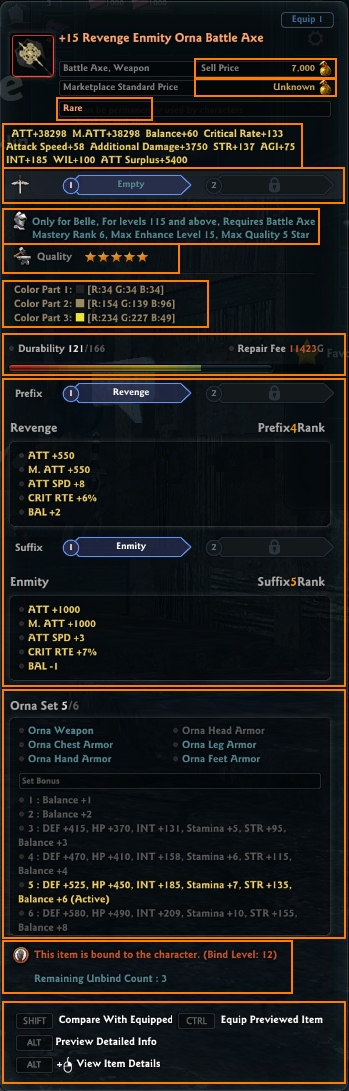
There can also be further information, like in the equipment tooltip below.
|
1) Sell Price: Shows the gold you receive when selling the item to the shop. 2) Marketplace Standard Price: Shows how much the item is being traded for at the Marketplace. (* If the Marketplace Standard Price is higher, you would make more by selling it on the marketplace than the NPC shop.) 3) Item Rank: Shows the rank of the item.
4) Item Stats: Shows the stats applied to the character when the item is equipped. 6) Shows the character that can equip the item / level / required skill / max enhancement level / max quality / max enchant rank. 7) Quality: Added to the item. The item's stats increase, the higher the quality. Item quality is minimum ★ to maximum ★★★★★. 8) Color: Shows the color that is currently applied to the item. 9) Durability: Shows the max and current durability of the item. If 0, the item cannot be used. 10) Enchantment: Shows the stats of the enchanted item (if it was enchanted). 11) Set Item Options: This is a description of the set stats. For composited items, you get a set bonus if you equip more than a certain amount of weapons and armors made with boss monster material. 12) Status Details: You can see whether the item is bound to the character, or whether the item was restored after getting destroyed from failing an enhancement or enchant. 13) Controls: You can view and compare the item information. |
Below are more context on the 'Item Rank' system.
- For most Fine items, Lv. 1-80 characters can equip them.
- For most Superior items, Lv. 81-89 characters can equip them.
- For most Rare items, Lv. 90-95 characters can equip them.
Item rank is differentiated by color. It's displayed by color per rank in the Storage Chest and system messages easily tell what rank of item you have obtained.
You can get Lv. 1-80 equipment from either Expertise crafting, as story completion rewards, or as loot from battle for the relevant level of equipment.
These items have their own respective probability rates to be enhanced or enchanted.
Lv. 90+ weapon/armor can either be crafted using Expertise, or by interacting with the Rocheste Magician's Guild NPC Dianann.
Accessories (earrings, belt, bracelet) can be crafted by Goldsmithing Expertise or from Colhen Magic Labatory NPC Brynn.
When you craft equipment through NPC Dianann, it will be crafted as tradable regardless of the usual tradability of the materials.
But if you craft the equipment yourself with Expertise, although you have a chance to earn a higher quality item than Dianann, its tradability is determined by the tradability/binding of the materials.
| Criteria | Content |
| A binding item exists among the materials | Crafted Equipment will be bound to the character |
| All items used as materials are tradable | Crafted Equipment will be tradable |
| This guide reflects up-to-date information as of May 2024. |
