■ Comrade Transfer
If you are missing out on unlocking special skills and comrade share setting benefits because different characters own various types of comrades, try using the Comrade Transfer system.
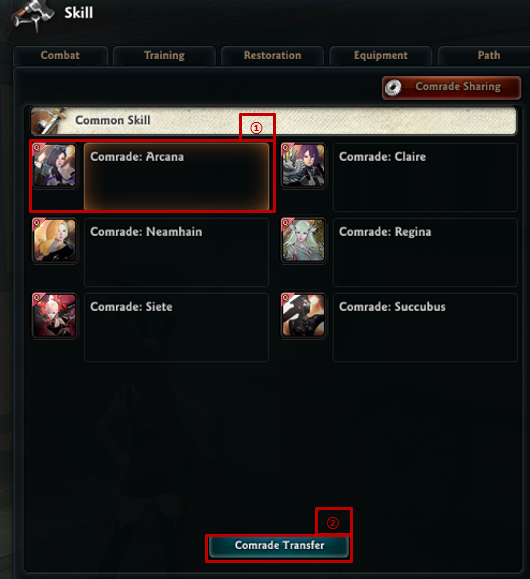
Move to the comrade tab in Skill (Shortcut Key: [V]), and then
- Select the comrade you want to transfer
- Click the [Comrade Transfer] button
■ Precautions when using the Comrade Transfer system
Comrades that are being shared to another character within your account cannot be transferred.
You have to cancel the comrade sharing first, and then access the Comrade Transfer system.
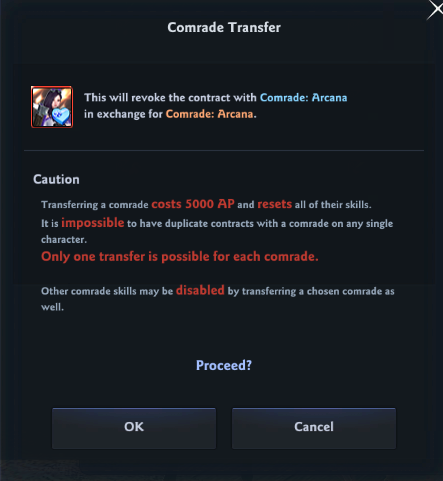
Clicking the Comrade Transfer button will load the caution notes in the Comrade Transfer system.
|
Caution Transferring a comrade costs 5,000 AP and resets all of their skills. Other comrade skills may be disabled by transferring a chosen comrade as well. |
Please note that after losing a comrade's skill after transfer, if you sign the [Eternal Contract] with the same comrade you've transferred, you will regain the Special Skill in the same state as the one you trained it in.
If you have read the precautions, Press OK to see the tradable comrade item within your account, in the NX Storage Chest on your Storage Chest (Shortcut Key: [B]).
The obtained comrade item can be moved to another character within the account. Use the item after you've moved it to a desired character.
| This guide reflects up-to-date information as of May 2021. |
