■ How to Enchant
You can attempt the enchant through NPC Brynn in Colhen.
The following items are required to enchant:
- Item to enchant (weapon, armor, or accessory item)
- Enchant Scroll
- Enchant Material (Magic Elixir)
- Enchant Rune (Optional)
Talk to NPC Brynn from the Magic Laboratory. Then, click the "Enchant" button.
- Click the empty slot, and it will automatically display the list of usable enchants and items.
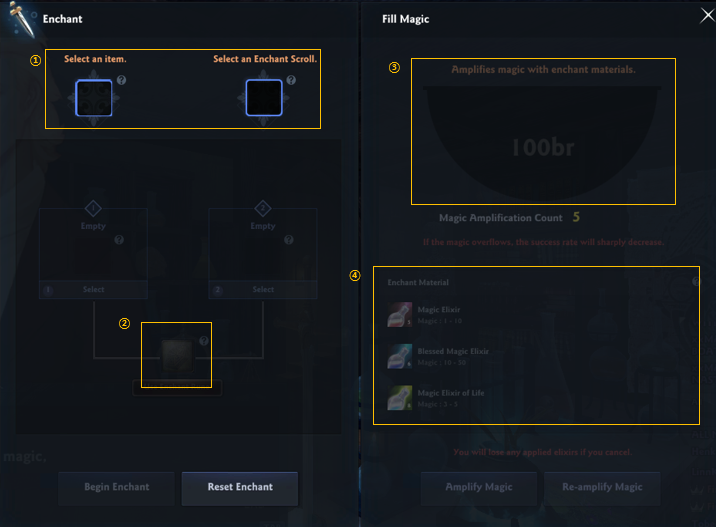
|
1. Insert the Enchant Scroll on the left slot, and the item to be enchanted on the right slot. 2. This is a slot that you can put the Enchant Rune, which prevents the Enchant failure penalty. 3. The UI design is a pot that pours out magic. You can pour these in magic units (also called "Brynn," as they are named after him!) to increase the odds of the Enchant's success. 4. A material that can amplify the magic. Click 1 of the materials and click the "amplify magic" button to fill. |
You cannot change the Enchant Scroll and item once you amplify, so make sure you check the item and scroll before confirming the process.
- A warning pop-up will display that you will not be able to change the item, before you fill the magic.
The amount of magic that you can fill will vary per enchant, and you can fill a up to a value within a set range. (Magic is quantified in "Brynn" units.)
- You can only pour and amplify the magic up to 5 times, and if you amplify more magic than the set amount, the success rate will decrease.
- If you want to amplify magic again, you can click the "Re-amplify Magic" on the bottom left to start over.
- Reamplifying will eliminate all materials. This is also applicable when you cancel the enchant in the middle of the procedure.
Once you filled up enough magic, press "Begin Enchant" to proceed.
| This guide reflects up-to-date information as of June 2017. |
