■ Selling
Open the 'Marketplace > Item Listing' tab, then right-click or drag the item you want to sell from the Storage Chest.
For example, if you're selling 41 Iron Ores, you will be required to enter basic information as the following image.
- The price per unit is entered automatically by setting the average price of items traded the previous day.
- The quantity and price per unit can be changed by entering the number you wish to enter.
- The listing period can be chosen between 1 day, 3 days, or 7 days.
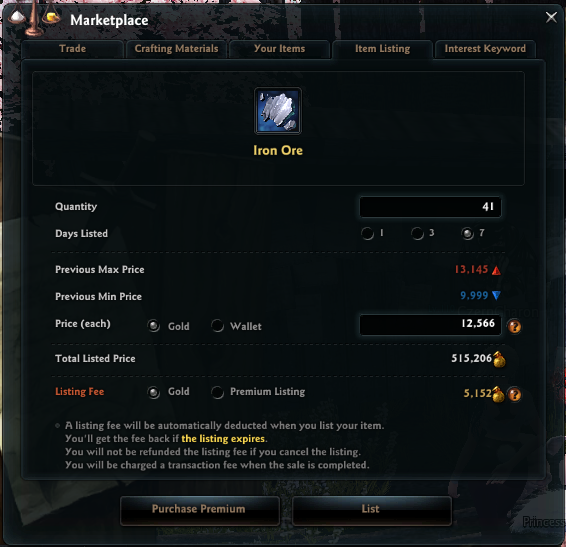
Once all sale information has been entered, press the 'List' button to place it for sale.
- Make sure to check the listing period when selling items with an expiration date. (e.g. Enchant Scrolls)
- You cannot list an item for sale if its expiration date exceeds your listing period.
- Items with depleted durability cannot be listed in the Marketplace. They must be repaired beforehand.
■ Purchasing
Open the 'Marketplace > Trade' tab to find an item to purchase.
If you know the name of the item you wish to search for, enter it in the search field, and then click the Search button.
For example, you can search like the image below if you want to purchase an Empty Bowl.
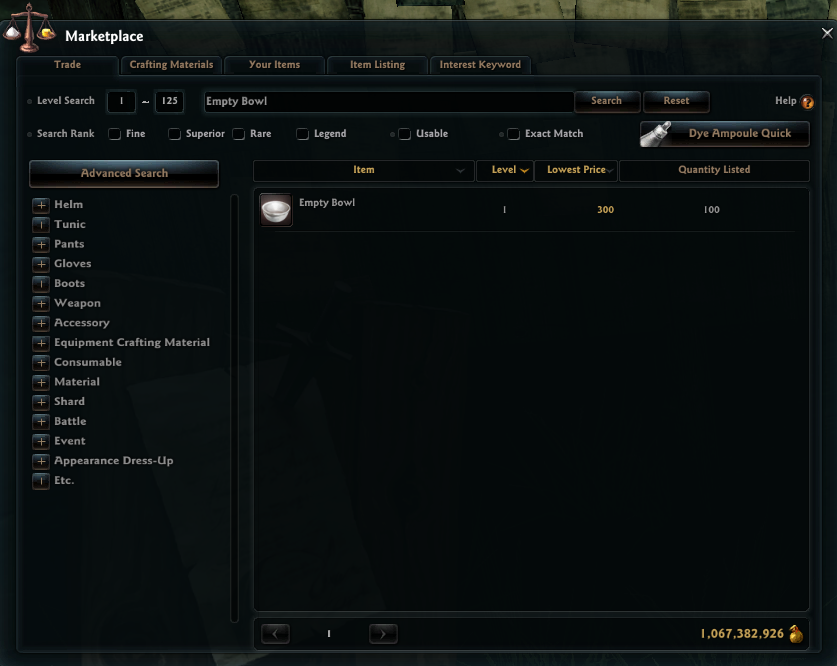
Double-click the item you wish to buy at the desired price.
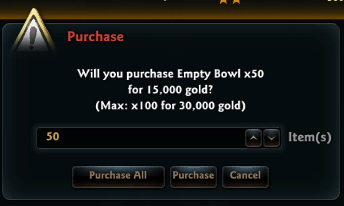
When the Marketplace Purchase window opens, enter the quantity you want to purchase, and click the Purchase button.
- You will be shown the purchase cost according to the total quantity(Price per each item x Quantity).
- An Item Bind Confirmation message will be shown if the purchased item will be bound to a character.
You can either press the Purchase button to purchase the quantity you want, or press [Purchase All] to purchase the entire quantity being sold.
If you do not know the exact name of an item, you can press the categories at the left to only view items of the necessary category.
For Instance, if you're looking for Magic Elixir, you can search from the 'Material > Enchant' category.
You can also press the Switch to Advanced Search button for more detailed criteria.
■ Trade Fees
| Trade Format | Stage | Trade Fee |
| Selling Items | Registered on Market | 1% of the sales price, regardless of the listing period (Maximum 10,000) |
| Registration Period Expiration | Listing Fee is refunded | |
| Sold / Registration Canceled | Listing Fee is not refunded |
- Once the listed item is sold, 5% of the sales price will be deducted as a transaction fee.
- You cannot purchase the items listed twice within the same account.
| This guide reflects up-to-date information as of May 2021. |
