■ Overview
You can use Equipment Share to share the gear of a character with another character within your account.
You can find the Equipment Share and Transfer System from the Menu (Shortcut Key: T).
(You can access Equipment Share in town and the Guild House.)
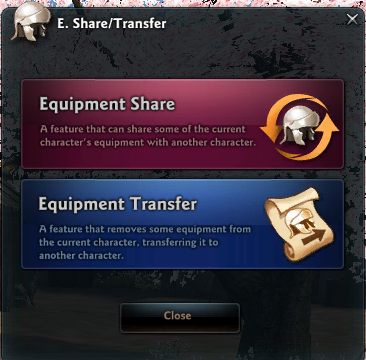
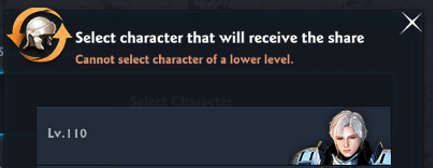
■ Select the Character to Share
Equipment Share is only available with characters above Lv. 110. The target character's level must be alike or higher than the sharing character.
You can only select one character to receive the Equipment Share.
- Once Equipment Share is active, the pairing will be maintained even when the sharing character levels up to be higher than the target character.
The weapon and auxiliary equipment will be converted into a form that the recipient can use. If the character receiving the share has a second weapon, you can select which type of weapon to convert into.
For example, sharing Fiona's Longsword and Small Shield would give Charon an Orbis and Totem.
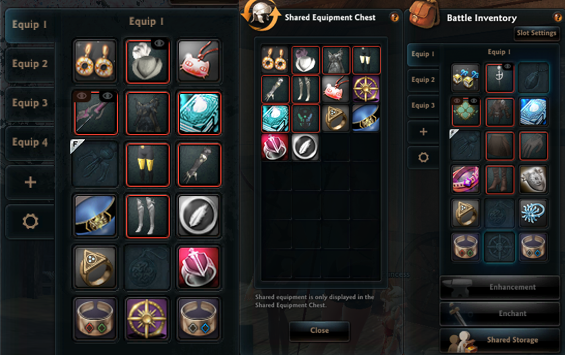
[Left: the equipment of the sharing main character, Latiya. Right: the equipment of the recipient character, Charon.]
- The shared equipment you receive can be found in the Storage Chest (Shortcut Key: I)'s Shared Equipment. The recipient character will not be calculated into the rankings.
■ Using Equipment Share
You can select upto 32 pieces of gear for equipment sharing, and you will be required to pay a certain amount of gold according to the value of each gear.
- You can select gears of Lv.105+ for Weapon, Armor, Earrings, Belt and Rings
- For Necklace, Bracelet and Brooch, you can select certain items under Lv.105 as well.
You can use the "Copy with Equip Tab contents" option to duplicate the equip tab's status onto the recipient of the Equipment Share.
However, you cannot use the copy feature if the recipient character has not activated the pertinent equip tab.
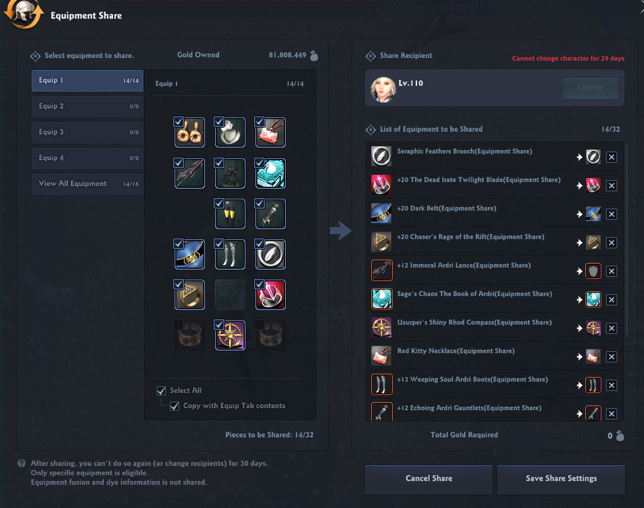
- Item's Fusion and Dye properties are not carried over through Equipment Share. Fusing or dying the equipment as the original owner will not affect the share recipient's versions.
- If you are having trouble equipping the shared gear, please check the recipient's equipment mastery skills, and the completion status of the equipment's related story content.
- If the enchant on the item to be shared cannot be applied to the resulting item, that enchant information will disappear.
■ Equipment Share Relationship
Equipment Share has a cooldown of 15 days.
However, characters who are already sharing equipment with one another can share additional equipment without the cooldown simply by paying a set amount of gold.
Characters that are sharing equipment will share the departure count of the battles below.
- Space Time Distortion
- Raid Battle
- Redeemers (For Redeemers, the obtained status of each Bonus Reward Box will also be shared.)
- Special Dungeon
- Royal Army
- Red Moon's Energy
- Abyssal Arena
- Niflheim
Characters that are sharing equipment will also share weekly raid mission rewards. The progress and reward obtain status of daily, weekly and monthly battle missions will also be shared.
- If you disable equipment sharing, the target character's temporal battle missions and weekly raid mission progress will be reset.
- However, missions that you have already claimed its rewards will not be reset.
Characters that are sharing equipment will share Core Boost Counts.
- If you use Core Boost with one character, the other character's core boost count will also decrease.
- Once equipment share is active, the two characters' core boost count will be synchronized to one with lower value.
The character that's sharing the equipment can alter the equipment's stats via enhancement, enchant, etc. The altered stats are applied to the recipient character's equipment properties as well. (Cosmetic changes such as Fusion, Dye, etc. will not be applied.)
However, the recipient character of the Equipment Share cannot alter the equipment's properties.
■ Canceling the Equipment Share
You can cancel equipment share at any time. However, canceling equipment share will not reduce or remove the cooldown duration.
If you remove the equipment you are sharing by selling, dismantling or any actions of the like, it will immediately cancel equipment share. Also, if you share equipment to another character, the previous share will be canceled.
Even if you reacquire the equipment by buying it back from the shop, the canceled share relationship will not be restored. You will be required to pay additional gold to share the gear again.
Equipment Share relationships between characters are maintained even if individual pieces of equipment are unshared, and even if there aren't any more pieces left to share.
While equipment share is active, the departure counts will be also shared between these characters. If you wish to terminate the relationship, you must use the 'Cancel Equipment Share' button from the UI.
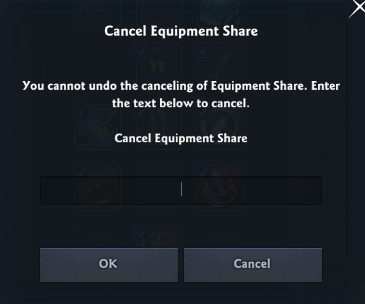
Deleting a character that's in an Equipment Share relationship (including Character Deletion Standby) will also terminates the Equipment Share relationship, along with canceling the Equipment Share status.
| This guide reflects up-to-date information as of June 2024. |
