■ Pets
Pets are companions that follow and assist you both in town and in battle.
In town, they trail behind their owner and may mimic certain expressions depending on their type.
In battle, each Pet uses its own unique skills to support its owner.
Pets are shared across all characters on the same account. You can obtain Pets in two ways.
- As part of paid random items.
- As event rewards or through the Marketplace Message Board
■ Pet Abilities
Each Pet has different abilities depending on its type. Here are a few examples of what some Pets can do.
|
Pet Name |
Function |
|
|
|
|
|
|
|
|
■ How to utilize Pets
Once you've registered a Pet by right-clicking its icon, you can summon it to your side from 'Menu > Pet(P).'
When a pet is summoned, a 'P' icon will appear on its image. The indicator will disappear when you dismiss the pet.
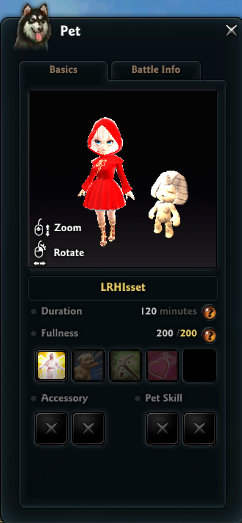
In the 'Pet > Basics' tab, you can view your pet's adorable appearance, remaining summon time, and fullness level.
|
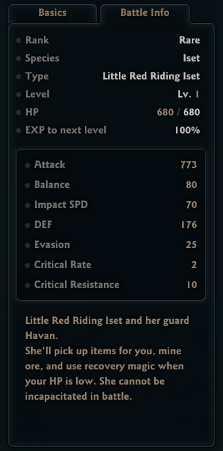
In the 'Pet > Battle Info' tab, you can view your Pet's detailed combat stats.
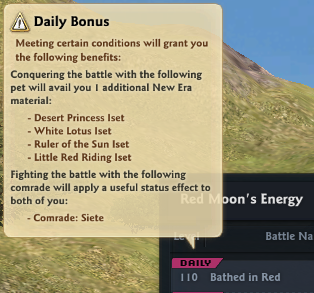
Additionally, when you go into battle in [Toward Taratha > 'Red Moon's Energy' Battle Region] with a rare Pet, a 'Daily Bonus' will be applied under certain conditions.
- When you complete a battle with certain Pets, you can obtain 1 additional 'New Era Material.'
- The Pet that grants the Daily Bonus changes every day at 07:00 AM UTC.
■ How to make your pets stronger
Your Pet will grow hungry based on how long it's been summoned during battle.
Feed your Pet to restore its fullness. Your Pet's condition will change depending on its fullness level.
|
Fullness Level |
Status |
|
0 |
Pet Skill Unavailable |
|
1 - 99 |
Normal State |
|
100 - 149 |
Pet Attack / Defense slightly increased |
|
150 - 200 |
Pet Attack / Defense greatly increased |
To restore fullness, you need to feed your Pet with Pet Food.
You can cook Pet Food yourself, purchase it from the Supply Depot or Marketplace, or obtain it as a reward from daily missions and events.
There are two main ways to feed your Pet.
- Feed Now: Feed one Pet Food at a time to the currently summoned Pet whenever you want to increase its fullness.
- Add to Shared Food: When your Pet's fullness drops, the registered food will automatically be consumed to feed your Pet. However, once Pet Food has been added to Shared Food, it can no longer be sold on the Marketplace.
If you want to become stronger, enhance your Pet's skills. Magic Gems can be purchased from the Supply Depot.
- Once equipped, you can no longer move it to another pet or discard it, so make sure to double check before equipping.
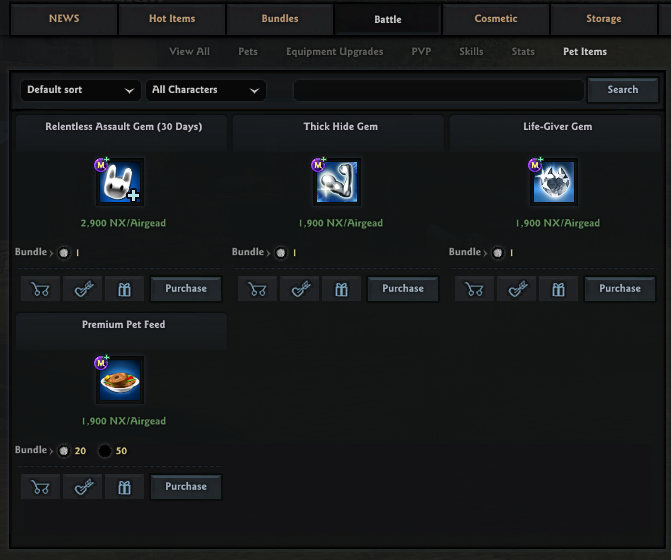
Refer to the guide below for the effects of the three types of Magic Gems that can be equipped and used in your Pet's skill slots.
|
Item Name |
Description |
|
Relentless Assault Gem (30 Days) |
|
|
Thick Hide Gem (30 days) |
|
|
Life-Giver Gem (30 Days) |
|
Additionally, once your Pet reaches level 50, you'll unlock the Pet Vanguard to assist during 'Vanguard Missions’, a feature of the Partholon Vanguard.
By assigning your Pet to the Pet Vanguard and sending it on Missions, you can earn extra Vanguard Points and various other rewards.
■ Pet Encyclopedia
In the Pet Encyclopedia, you can view detailed information about your active Pet as well as the bonuses you receive based on the Pets you own, all in one place.
Click the [Pet Encyclopedia] button below the Pet List window (Shortcut Key [P]).
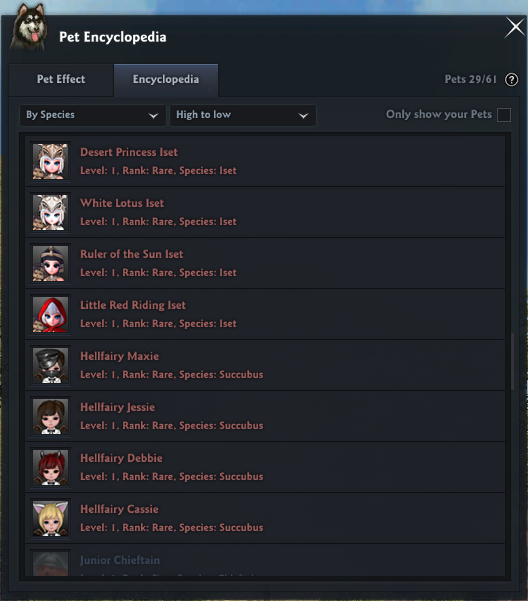
In the Pet Encyclopedia, you can view more detailed information about each Pet.
- You can filter list of pets by category.
- You can check how many pets you have.
- You can click on each pet to see the detailed stats.
In the Pet Effects tab, you can check what effects you can get from pets.
Pet Effects are divided into Selective Effects and Continuous Effects, and you can gain these effects when their activation conditions are met.
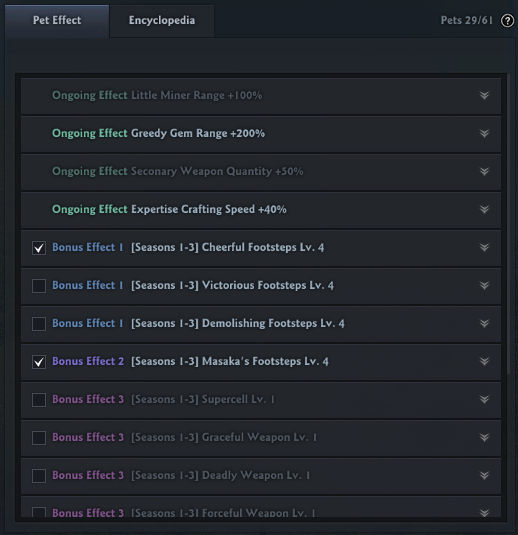
The benefits of each Selective Effect are as follows.
|
Selective Effect Type |
Details |
|
Cheerful Footsteps |
|
|
Victorious Footsteps |
|
|
Demolishing Footsteps |
|
| This guide reflects up-to-date information as of October 2017. |
